BytesGlue
CreekPOS logoCreekPOS

POS software for shops, cafés & restaurants

Sell at the counter. Stay in control from anywhere.

CreekPOS brings the till, stock and customer balances together for independent retailers and hospitality teams. Keep the counter practical for staff and the numbers clear for the owner, with UAE VAT workflows, multilingual interfaces and tools that grow from one shop to several branches.

CreekPOS official cashier and minimarket illustration
From the CreekPOS product website
  • Shops & minimarkets
  • Cafés & restaurants
  • Specialist retailers
  • Multi-branch operators

The work it helps you do

Built around the way you operate.

Explore the workflows behind CreekPOS, from everyday details to the bigger picture.

01

A practical till on the devices you choose

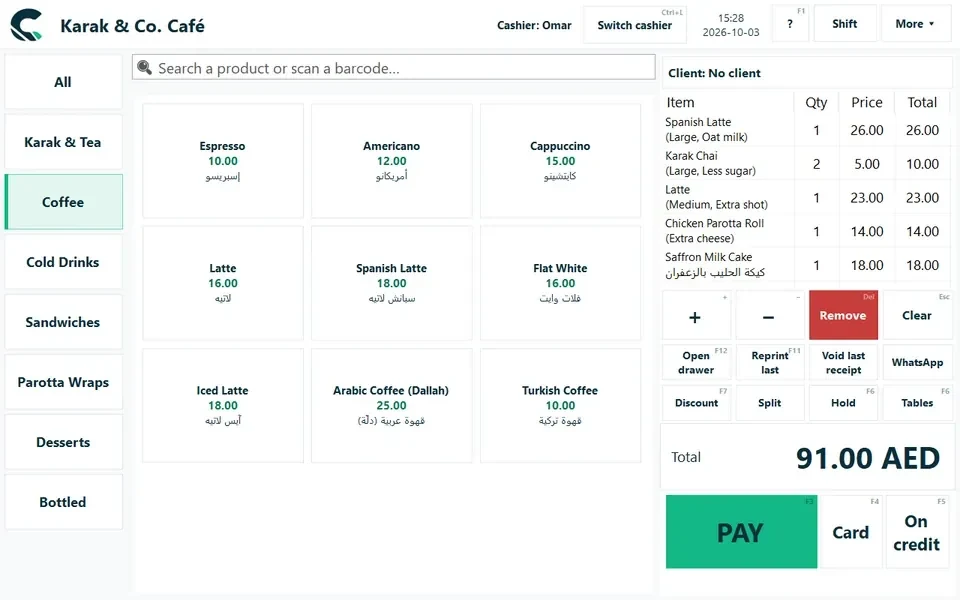
Sell from a Windows, Mac, Linux or Android Till, then follow the business from the Online owner workspace. Scan barcodes, find items quickly, choose sizes and add-ons, and take the payment without leaving the sale. The connected Till can continue offline and synchronise later. Use compatible counter equipment rather than tying the business to one hardware package.

02

See the stock behind every sale

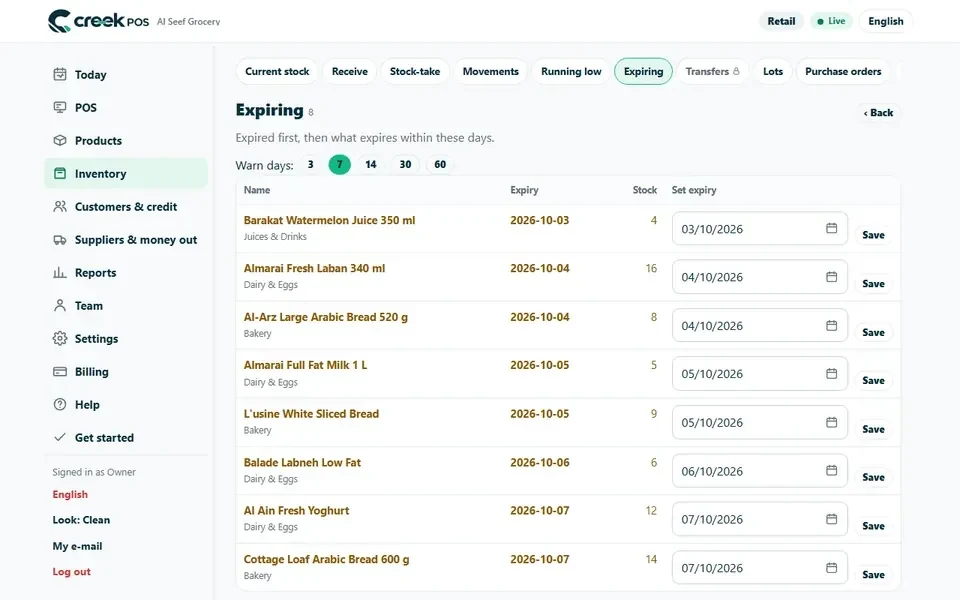
Keep products, purchases, suppliers and inventory movements connected. Stock and expiry views identify low quantities and products needing attention first. Lot, weight, serial and variant workflows suit different kinds of shop. Branch transfers and central product management help growing businesses move goods and keep the catalogue consistent without re-entering the same data at each location.

03

From a table order to the kitchen

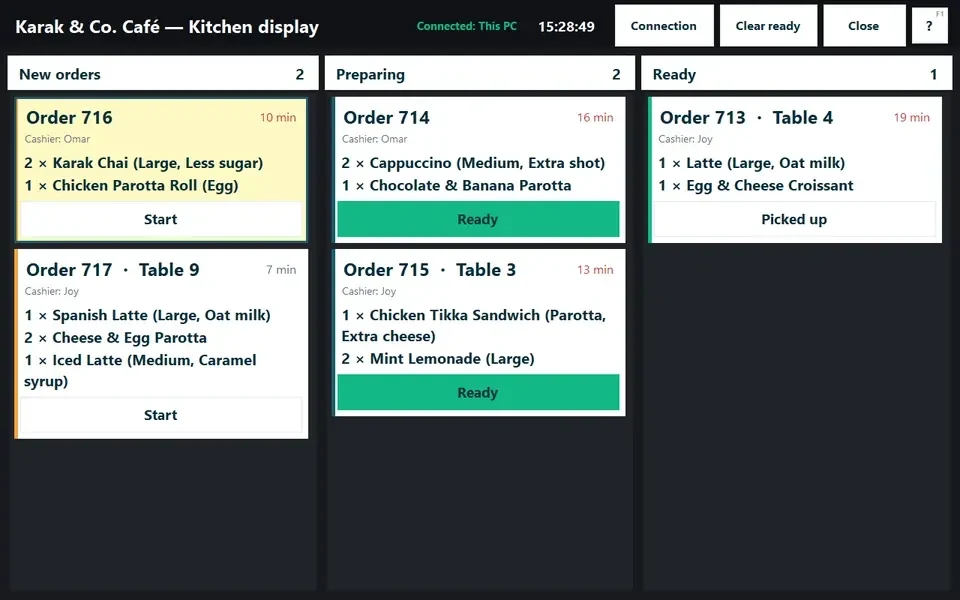
Manage café sizes and add-ons, restaurant tables and kitchen orders in one service flow. Preparation screens keep the order and its options visible, while table and waiter tools help front-of-house staff follow progress. Split billing, QR ordering and recipe stock support different operating styles. A recipe deducts its configured ingredients, connecting food stock directly to what customers order.

04

Clearer cash, credit and owner reporting

Check today’s sales, profit and customer balances on your phone. Give staff their own access and review shift close, voids, large discounts and cash variance. UAE receipts can include Arabic and English lines, VAT and the business TRN. Credit records show who owes what, helping the owner collect balances with the actual transaction history rather than memory.

05

More than a basic receipt

Paperless receipts, digital stamp cards and customer history continue the relationship after checkout. Job orders and deposits suit repairs or work collected later; specialist workflows cover laundry tags, prepaid coupon books and salon commissions. Choose the tools that fit the operation instead of asking the cashier to manage every edge case in a spreadsheet.

06

Grow the workspace at your pace

Online plans extend into accounting, purchasing, bookings and employee workflows. Start with the modules you need and add others as the business changes. English, Arabic, Hindi and Urdu help mixed-language teams work together. Optional AI and reporting connections make shop information easier to ask about, with owner control over activation. The separate Desktop edition has its own features and purchase route.

See the product

A closer look at CreekPOS.

Product screens and visuals from the official website. Screens may show fictional demonstration data; features vary by edition and plan.

Go beyond the basics

CreekPOS beyond checkout: the stock workflows worth setting up

Sales totals tell only part of the story. Use ingredient costing, preparation, waste and stock review to connect the till with what happens behind it.

Read the practical guide →

Your next steps

Start with the workflow that matters.

  1. Explore before you migrate

    Try the interactive demo and follow a sale through the reports. The Online trial lasts 14 days and does not require a card. Check the separate Desktop edition if it better matches your operating model.

  2. Import and check the catalogue

    Bring products across from a supported spreadsheet or migration route. Review barcodes, VAT, selling units and opening stock, then test a receipt and return with the staff who will use the Till.

  3. Pair the Till and begin a shift

    Install the counter app, pair it with the workspace and check compatible peripherals. Add cashier permissions, configure restaurant or retail options and review the first shift from the owner’s phone.

Before you start

A few useful answers.

Need help choosing the right setup?

Talk to the team →
Is CreekPOS only for the UAE?

UAE shop and VAT workflows are a strong focus, but CreekPOS also serves international businesses. Check the country and tax configuration on the product website for your location.

What happens when the internet stops?

The connected Till can continue selling offline and synchronise when connected again. Online administration and external services still need connectivity. Check the edition and device setup for your shop.

Can I use my own printer and scanner?

CreekPOS supports compatible peripherals and does not require one branded hardware package. Check model and connection compatibility before replacing existing equipment.

Can I follow the shop from my phone?

Yes. The Online owner workspace presents sales, stock and customer balances away from the counter. Staff permissions, reports and optional alerts help focus on transactions needing attention.

Take the next step

See what CreekPOS can do for you.

Explore the product, review its current plans and find the workflow that fits your team.

Compare CreekPOS and Odoo POS →
Customer support Talk to us